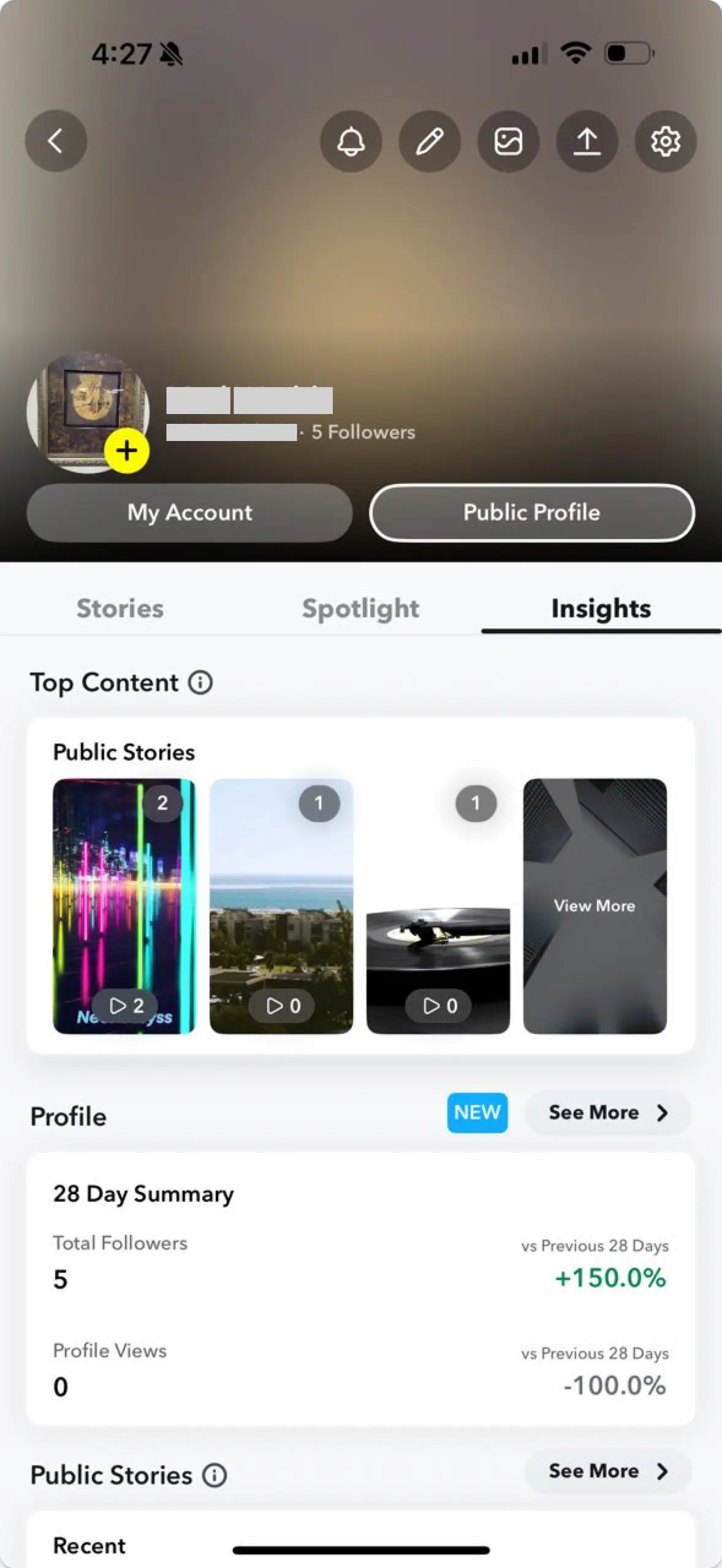
Snapchat continues to be a powerhouse platform with over 900 million monthly active users and unmatched engagement among younger demographics – Snap has started to become very popular amongst our friends and family. For businesses and developers looking to reach this audience, Snapchat’s unique features like stories, saved stories, and spotlights might seem different at first, but they’re actually pretty straightforward to work with through the API. Once you get into it, you’ll find that Snapchat not only offers great engagement for your users, but the technical implementation is easier than you’d expect.
Ayrshare has partnered with the Snapchat Public Profile API team to provide seamless integration for Snapchat posting and analytics through their our Social Media API, making it a “snap” to manage Stories, Saved Stories, and Spotlight content programmatically. Pun intended!
There are two parts to this article: how to directly integrate with the Snapchat API, known as the Snap API, and how to use the Ayrshare Social API with Snapchat.
Let’s dive in and see how you can manage your users’ Snapchat presence, from linking accounts to publishing content and tracking performance.
Getting Started with the Snapchat API
The Snapchat API for publishing content and getting analytics is a relatively new offering, and Snapchat is continually enhancing their capabilities. The Snap API provides powerful capabilities for businesses to programmatically manage their public profiles, publish content, and track performance metrics. Here’s how to get started with the two most common use cases: publishing stories and retrieving analytics.
Note: To integrate directly with the Snapchat API, you must first submit your account for review. Snapchat will need to approve your application and add you to their developer allowlist before you can access the API.
Authentication Setup
Before making any API calls, you’ll need to set up OAuth authentication. The Snapchat API uses OAuth 2.0 with authorization codes. This is a standard authentication workflow for social networks.
First you’ll generate a Snapchat authorization URL with your Snap client key, secret key, scope, and redirect URL. On this page, your users will permission you to access their Snapchat accounts.
https://accounts.snapchat.com/login/oauth2/authorize?response_type=code&client_id={your_client_id}&redirect_uri={your_redirect_uri}&scope=snapchat-profile-api&state=wmKkg0TWgppW8PTBZ20sldUmF7hwvUIn the redirect to your website, Snapchat will provide you with a code that you’ll exchange for an access and refresh token. The access token you’ll use for all requests on behalf of your user.
Here is an example in Node.js (JavaScript) of the exchange for the tokens:
const exchangeCodeForToken = async (uid, code, client_id, client_secret, redirectUri) => {
  const url = `https://accounts.snapchat.com/login/oauth2/access_token`;

  const formData = new URLSearchParams();
  formData.append("grant_type", "authorization_code");
  formData.append("client_id", client_id);
  formData.append("client_secret", client_secret);
  formData.append("code", code);
  formData.append("redirect_uri", redirectUri);

  const response = await fetch(url, {
    method: "POST",
    headers: {
      "Content-Type": "application/x-www-form-urlencoded"
    },
    body: formData
  });

  return await response.json();
};
This function handles the OAuth 2.0 authorization code flow by exchanging a temporary authorization code for access and refresh tokens. The form data must be URL-encoded and includes all the standard OAuth parameters. The returned tokens will be used for subsequent API calls to authenticate your requests.
Publishing a Story
Publishing content to Snapchat involves two main steps: uploading media and creating the story. Here’s a simplified example of the publishing – see below for how to upload the media and get the mediaId:
const publishSnapchatStory = async (profileId, mediaId, accessToken, caption = "") => {
  const publishUrl = `https://businessapi.snapchat.com/v1/public_profiles/${profileId}/stories`;

  const publishData = {
    media_id: mediaId
  };

  const response = await fetch(publishUrl, {
    method: "POST",
    headers: {
      Authorization: `Bearer ${accessToken}`,
      "Content-Type": "application/json"
    },
    body: JSON.stringify(publishData)
  });

  const result = await response.json();

  if (result.request_status === "SUCCESS") {
    return {
      status: "success",
      storyId: result.stories[0].story.id,
      postUrl: `https://www.snapchat.com/add/${username}/${result.stories[0].story.id}`
    };
  }

  throw new Error(`Failed to publish: ${JSON.stringify(result)}`);
};
This function takes the mediaId from a successful upload and publishes it as a story to your public profile as a Snapchat story. The API responds with story details including a unique story ID. Note that Snapchat stories are ephemeral by default, but the API allows you to create “saved stories” that persist longer. The returned URL provides a direct link to view the published content.
Media Upload Process
Before publishing, you’ll need to upload your Snapchat media with encryption:
const uploadSnapchatMedia = async (mediaUrl, profileId, accessToken) => {
  // Step 1: Create media container
  const containerUrl = `https://businessapi.snapchat.com/v1/public_profiles/${profileId}/media`;
  const mediaType = checkIsVideo(mediaUrl) ? "VIDEO" : "IMAGE";

  // Generate encryption key and IV
  const key = execSync("openssl rand -hex 32").toString().trim();
  const iv = execSync("openssl rand -hex 16").toString().trim();

  const containerPayload = {
    type: mediaType,
    name: `snapchat-media-${Date.now()}`,
    key: Buffer.from(key, "hex").toString("base64"),
    iv: Buffer.from(iv, "hex").toString("base64")
  };

  const containerResponse = await fetch(containerUrl, {
    method: "POST",
    headers: {
      Authorization: `Bearer ${accessToken}`,
      "Content-Type": "application/json"
    },
    body: JSON.stringify(containerPayload)
  });

  const containerData = await containerResponse.json();

  // Step 2: Upload encrypted media chunks
  // Step 3: Finalize upload
  // (Implementation details omitted for brevity)

  return {
    status: "success",
    mediaId: containerData.media_id
  };
};
Snapchat’s media upload process is unique in that it requires AES-256-CBC encryption of all media files. First, you create a “container” by providing encryption keys and metadata. The API responds with upload endpoints and a media ID. The actual media file must then be encrypted with your generated key/IV pair and uploaded in chunks. This security measure ensures that media is protected during transit and storage.
Retrieving Analytics
Once your content is published, you can retrieve performance metrics:
const getSnapchatAnalytics = async (storyId, profileId, accessToken) => {
  const url = `https://businessapi.snapchat.com/v1/public_profiles/${profileId}/stories/${storyId}/stats?assetType=STORY`;

  const response = await fetch(url, {
    method: "GET",
    headers: {
      Authorization: `Bearer ${accessToken}`
    }
  });

  const analyticsData = await response.json();

  // Process and format analytics data
  const { assets } = analyticsData;
  const metrics = assets?.map(asset => {
    const fields = asset.timeseries?.[0]?.fields;

    return fields?.reduce((acc, fieldObj) => {
      const fieldName = fieldObj.field?.field_name?.toLowerCase();
      const value = fieldObj.stats?.[0]?.value;

      if (fieldName) {
        acc[fieldName.replace('_millis', '')] = Number(value);
      }

      return acc;
    }, {});
  });

  return {
    storyId,
    analytics: metrics,
    lastUpdated: new Date().toISOString()
  };
};
The analytics endpoint returns time-series data with various engagement metrics like views, screenshots, and interaction counts. The data structure includes nested arrays that need to be flattened and normalized if you want to display it to your users. This is very valuable data for understanding content performance and audience engagement patterns.
Key Considerations
- Media Encryption: Snapchat requires all uploaded media to be AES-256-CBC encrypted.
- Chunked Uploads: Large files (>32MB) must be uploaded in chunks.
- Rate Limiting: Implement proper retry logic with exponential backoff.
- Token Refresh: Access tokens expire and need to be refreshed using refresh tokens.
The direct Snapchat API provides a robust foundation for programmatic media publishing and retrieving analytics, but requires careful attention to their specific requirements around media handling, encryption, and authentication flows.
What is Ayrshare’s Snapchat Integration?
Ayrshare’s Snapchat integration allows you to manage your Snapchat content through a unified API.
With it, you can:
- Link Snapchat accounts without complex OAuth flows.
- Publish Stories that disappear after 24 hours.
- Create Saved Stories that remain on your users’ profile permanently.
- Post videos to Spotlight for viral reach.
- Retrieve analytics for your Snapchat content.
- Manage multiple Snapchat accounts through profile keys.
Using Ayrshare is especially useful for businesses, agencies, and developers who want to streamline their social media management across multiple platforms while maintaining the unique features of each network.
How to Link Snapchat with Ayrshare
Before you can post to Snapchat through Ayrshare, you need to link your Snapchat account. This process is straightforward and requires just a few steps.
Prerequisites: Snapchat Public Profile
First, ensure you have a Snapchat Public Profile set up. This is required for API access. If you don’t have one:
- Open Snapchat and tap your icon in the top left corner.
- Click on “Public Profile”.
- Follow the setup instructions.

Linking Your Account
Once your Public Profile is ready, you can link Snapchat through Ayrshare’s dashboard or your users can link their Snapchat accounts via the Business Plan social linking page.
Via Dashboard:
- Navigate to the Social Accounts page in your Ayrshare dashboard.
- Click the Snapchat icon.
- Log in to Snapchat if prompted.
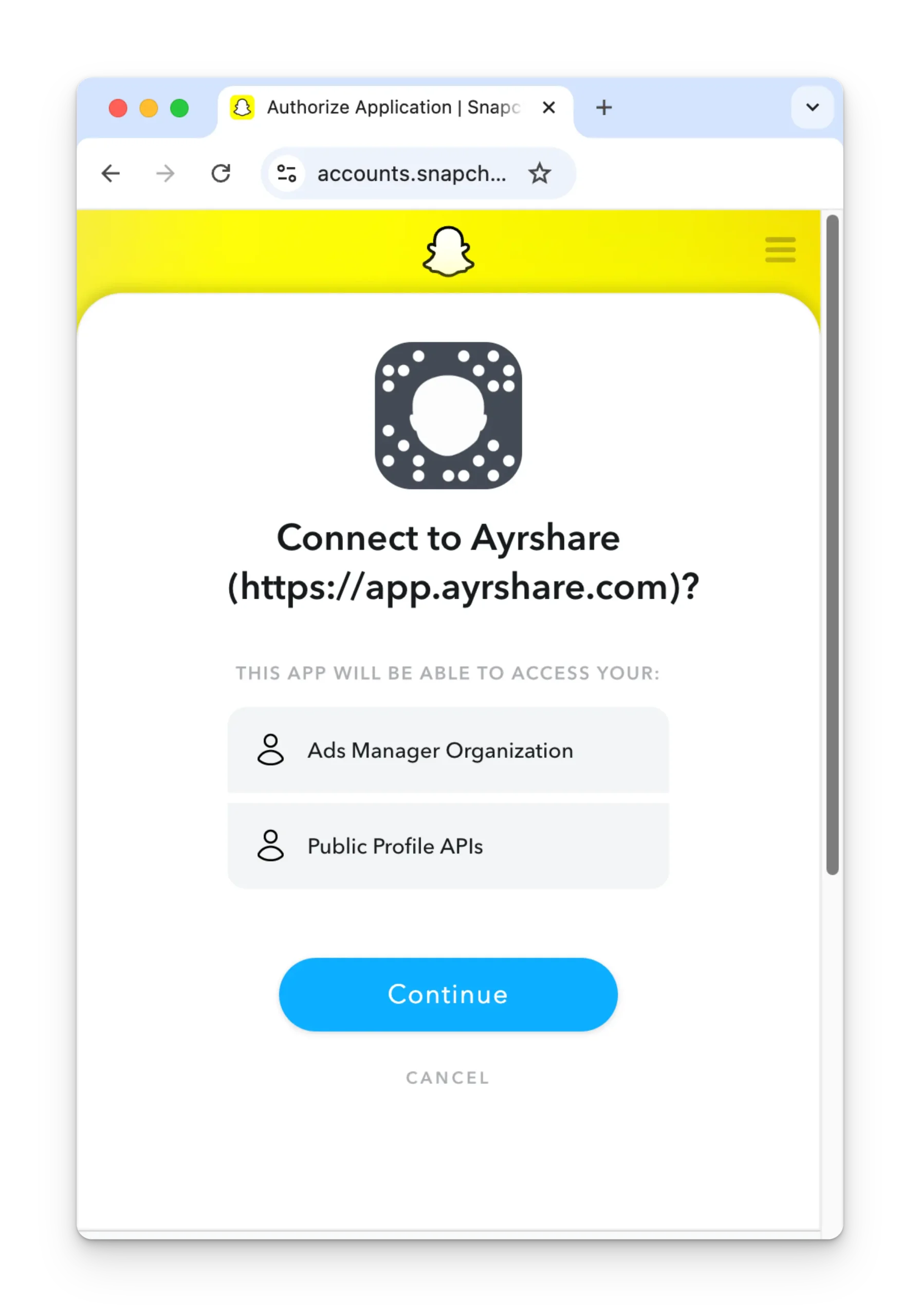
- Review permissions and click “Continue”.
- Your Snapchat account is now linked!
How to Post to Snapchat with Ayrshare
Now that your account is linked, let’s explore how to publish different types of content to Snapchat using Ayrshare’s API.
Publishing a Snapchat Story
Stories are temporary posts that appear in your followers’ feeds for 24 hours. They’re perfect for time-sensitive content and daily engagement.
Let’s see how you can publish Snapchat posts via the API.
Example in cURL:
curl \
  -H "Authorization: Bearer YOUR_API_KEY" \
  -H 'Content-Type: application/json' \
  -d '{
    "post": "Check out our flash sale! 🛍️ #DealOfTheDay",
    "platforms": ["snapchat"],
    "mediaUrls": ["https://example.com/sale-image.jpg"]
  }' \
  -X POST https://api.ayrshare.com/api/post
Example in JavaScript:
const postSnapchatStory = async () => {
  try {
    const response = await fetch("https://api.ayrshare.com/api/post", {
      method: "POST",
      headers: {
        "Authorization": `Bearer ${API_KEY}`,
        "Content-Type": "application/json"
      },
      body: JSON.stringify({
        post: "Behind the scenes at our office today! 📸",
        platforms: ["snapchat"],
        mediaUrls: ["https://example.com/office-video.mp4"]
      })
    });

    const data = await response.json();
    console.log("Story posted:", data);
    return data;
  } catch (error) {
    console.error("Failed to post story:", error);
  }
};
The response will include:
{
  "status": "success",
  "id": "625e1e5c8b5d4a001e3b3c5f",
  "postIds": {
    "snapchat": {
      "id": "hs8wksh29sd",
      "status": "success"
    }
  },
  "post": "Behind the scenes at our office today! 📸",
  "platforms": ["snapchat"]
}
Publishing a Saved Story
Saved Stories remain on your Public Profile indefinitely, making them perfect for evergreen content, highlights, or important announcements.
Example in Python of publishing a Saved Story via the API:
import requests

API_KEY = "YOUR_API_KEY"
url = "https://api.ayrshare.com/api/post"

payload = {
    "post": "Our company story: From startup to success 🚀",
    "platforms": ["snapchat"],
    "mediaUrls": ["https://example.com/company-story.mp4"],
    "snapChatOptions": {
        "savedStory": True
    }
}

headers = {
    "Authorization": f"Bearer {API_KEY}",
    "Content-Type": "application/json"
}

response = requests.post(url, json=payload, headers=headers)
print(response.json())
Publishing to Snapchat Spotlight
Spotlight is Snapchat’s entertainment platform where your content can reach millions through their discovery algorithm. It’s similar to TikTok’s For You page and perfect for viral content.
Example in Node.js of publishing a Spotlight via the API:
const axios = require('axios');

const postToSpotlight = async () => {
  const API_KEY = "YOUR_API_KEY";

  try {
    const response = await axios.post('https://api.ayrshare.com/api/post', {
      post: "Incredible transformation! Watch till the end 🤯 #BeforeAndAfter #Amazing #Viral",
      platforms: ['snapchat'],
      mediaUrls: ['https://example.com/transformation-video.mp4'],
      snapChatOptions: {
        spotlight: true
      }
    }, {
      headers: {
        'Authorization': `Bearer ${API_KEY}`,
        'Content-Type': 'application/json'
      }
    });

    console.log('Spotlight post created:', response.data);
    return response.data;
  } catch (error) {
    console.error('Spotlight post failed:', error);
  }
};
Working with Hashtags and Mentions
Hashtags are fully supported in Spotlight posts and help increase discoverability. Include them naturally in your post content:
{
  post: "New recipe alert! 🍕 #FoodTok #Recipe #Cooking #Yummy #ViralFood",
  platforms: ["snapchat"],
  mediaUrls: ["https://example.com/recipe-video.mp4"],
  snapChatOptions: {
    spotlight: true
  }
}
Note: While hashtags work great, user mentions (@username) in Spotlight posts currently don’t resolve as interactive mentions through the API.
Media Requirements and Best Practices
When uploading content, follow these Snapchat media specifications:
Story and Saved Story Media Guidelines
Images:
- Formats: JPEG, PNG.
- Maximum size: 20 MB.
- Recommended dimensions: 1080 x 1920 px.
- Aspect ratio: 9:16 (portrait).
Videos:
- Format: MP4.
- Maximum size: 500 MB.
- Duration: 5-60 seconds.
- Minimum dimensions: 540 x 960 px.
- Recommended: 1080 x 1920 px.
- Aspect ratio: 9:16 (portrait).
Spotlight Media Guidelines
Spotlight has the same technical requirements as Stories but remember:
- Only video content is typically featured in Spotlight.
- Vertical format (9:16) performs best.
- Hook viewers in the first 3 seconds.
- Use trending sounds and hashtags for better reach.
How to Get Snapchat Analytics
Understanding your content performance is crucial for optimizing your Snapchat strategy – and users love to see how their posts did. Ayrshare provides comprehensive analytics for your Snapchat posts.
Retrieving Post Analytics
To get analytics for a specific Snapchat post:
const API_KEY = "YOUR_API_KEY";

const getSnapchatAnalytics = async (postId) => {
  try {
    const response = await fetch("https://api.ayrshare.com/api/analytics/post", {
      method: "POST",
      headers: {
        "Authorization": `Bearer ${API_KEY}`,
        "Content-Type": "application/json"
      },
      body: JSON.stringify({
        id: postId,
        platforms: ["snapchat"]
      })
    });

    const analytics = await response.json();
    console.log("Snapchat analytics:", analytics);
    return analytics;
  } catch (error) {
    console.error("Failed to get analytics:", error);
  }
};

// Usage
getSnapchatAnalytics("625e1e5c8b5d4a001e3b3c5f");
The analytics response provides valuable metrics:
{
  "snapchat": {
      "id": "490edf20-4068-5bab-bf65-a5882b1ezuec",
      "postUrl": "https://www.snapchat.com/add/chrisalpha1980/490edf20-4068-5bab-bf65-a5882b1ezuecc",
      "analytics": [
          {
              "avgViewTime": 5230,        // Average view time in milliseconds
              "completes": 187,           // Number of times the post was played to completion
              "interactions": 42,         // Number of times a user interacted
              "mediaId": "490edf20-4068-5bab-bf65-a5882b1ezuec",
              "replies": 8,               // Number of replies to this snap/story
              "shares": 12,               // Number of times this post has been shared
              "snapCombinedUniques": 642, // Combined total of snapPaidUniques and storyUniques
              "snapCombinedViews": 829,   // Combined total of snapPaidViews and views
              "snapPaidUniques": 174,     // The sum of paid uniques for ads promoted
              "snapPaidViews": 203,       // The sum of paid impression for ads promoted
              "storyAvgViewTime": 4870,   // The calculation of the storyViewTime
              "storyFavorites": 28,       // Number of times the post has been liked
              "storySubscribes": 5,       // Number of subscribe events occuring
              "storyUniques": 468,        // Unique users who have viewed a story/snap
              "storyViewTime": 2279160,   // Milliseconds a story & snap in story viewed
              "storyViews": 626,          // Views for Story container
              "swipeDowns": 15,           // Number of swipe downs on this post
              "swipeUps": 23,             // Number of swipe ups on this post
              "uniqueSessions": 512,      // Number of unique sessions an asset engaged
              "viewTime": 3264000,        // Milliseconds this post has been viewed
              "viewers": 598,             // Number of unique users who have viewed this post
              "views": 712                // Number of times an asset has been viewed
          }
      ],
      "lastUpdated": "2025-05-21T11:14:40.570Z",
      "nextUpdate": "2025-05-21T11:25:40.570Z"
    }
}
These metrics help you understand such things as:
- Views: Total number of times your content was viewed.
- Shares: How many users shared your content.
- Completion Rate: Percentage of viewers who watched your entire video.
- Average View Time: How long users engaged with your content.
- Paid Views: How many views are paid.
- Replies: How many people replies to a Snap.
Managing Multiple Snapchat Accounts
For agencies or businesses managing multiple Snapchat accounts, the Business plan allows you to have a Profile Key for every user:
const postToClientAccount = async (profileKey, content) => {
  const response = await fetch("https://api.ayrshare.com/api/post", {
    method: "POST",
    headers: {
      "Authorization": `Bearer ${API_KEY}`,
      "Profile-Key": profileKey,
      "Content-Type": "application/json"
    },
    body: JSON.stringify({
      post: content.text,
      platforms: ["snapchat"],
      mediaUrls: [content.mediaUrl],
      snapChatOptions: content.options
    })
  });

  return await response.json();
};

// Post to different client accounts
await postToClientAccount("client1_profile_key", {
  text: "Client 1's amazing product!",
  mediaUrl: "https://example.com/client1-video.mp4",
  options: { spotlight: true }
});

await postToClientAccount("client2_profile_key", {
  text: "Client 2's special offer!",
  mediaUrl: "https://example.com/client2-image.jpg",
  options: { savedStory: true }
});
Best Practices for Snapchat Success
- Content Optimization
- Keep videos short and engaging (under 30 seconds for best performance).
- Use vertical format (9:16) for all content.
- Add captions for accessibility and silent viewing on Spotlights.
- Posting Strategy
- Post Stories daily for consistent engagement.
- Use Saved Stories for important evergreen content.
- Leverage Spotlight for viral potential with trending content.
- Post during peak hours (6-10 PM in your target timezone).
- Hashtag Strategy
- Analytics-Driven Optimization
- Track completion rates to optimize video length.
- Analyze view times to improve content pacing.
- A/B test different content styles and posting times.
Go Further
Ayrshare’s Snapchat integration is a powerful tool to enhance your social media strategy by allowing you to manage Snapchat content programmatically alongside other platforms. Whether you’re posting daily Stories, creating permanent Saved Stories, or reaching new audiences through Spotlight, Ayrshare simplifies the process while maintaining the unique features of each content type.
And Ayrshare not only offers Snapchat, but 12 other social network integrations including TikTok, Instagram, YouTube, and Facebook.
For more advanced Snapchat options and detailed documentation, check out: